Pages

Mar 25, 2018

SQL Server (Starting with 2016): How Many Foreign Key Can You create on a Table?

A table can reference a maximum of 253 other tables and columns as foreign keys (outgoing references). 

SQL Server 2016 increases the limit for the number of other table and columns that can reference columns in a single table (incoming references), from 253 to 10,000. (Requires at least 130 compatibility level.) 

Following are the limitations:

  • Greater than 253 foreign key references are supported for DELETE and UPDATE DML operations. MERGE operations are not supported.
  • A table with a foreign key reference to itself is still limited to 253 foreign key references.
  • Greater than 253 foreign key references are not currently available for columnstore indexes, memory-optimized tables, or Stretch Database.
References: Microsoft Books online


Mar 23, 2018

Installing Oracle Provider for OLEDB in SQL Server


Initially we do not see this provider in the drop down, which we open, create new linked server window.


We can find the provider in the below link, please find the appropriate version your system need.

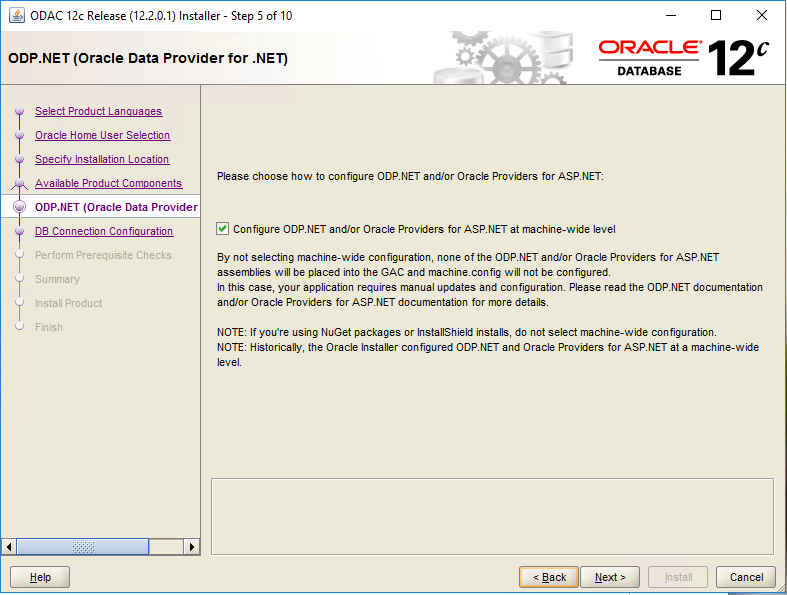
You will see below steps during installation.


Updated the path as suggested above and clicked Install. 


That’s it, you will see Oracle Provider for OLEDB in the drop down.


Mar 17, 2018

SQL Server: Database compatibility, what it is exactly!

Database compatibility is the feature of database comes along with the SQL server version. Database supports the new features of the current version and the previous versions with the help of backward compatibility of SQL Server.

For example AlwaysOn, Replication and DB objects like DMVs etc.

 Different Compatibility levels:


Compatibility Level Version
80 2000
90 2005
100 2008
110 2012
120 2014
130 2016
140 2017


Where to check it:
Right click database properties in object explorer and click options to see it.

When the Database Compatibility changes:

This value will change when 

a) we create the database from backup file.
b) Restoring the backup on existing DB.
c)  Upgrade the SQL Server.

How to change the DB Compatibility:

Using SSMS: object explorer->database->database properties->options->select the compatibility from drop down and click ok to save it.

T-SQL:
               ALTER DATABASE database_name
SET COMPATIBILITY_LEVEL = <Compatibility Level>


What forces you to change it: 

Changing the compatibility level is not a good practice though but when necessary we should do it (only 3 versions backward are supported though).

Legacy applications and desktop tools developed years ago and not upgraded would do it.

Did you see any other reason to lower the compatibility level?

Mar 16, 2018

SQL Server: The database principal owns a database role and cannot be dropped. (Microsoft SQL Server, Error: 15421)

Error while deleting the orphan user.

TITLE: Microsoft SQL Server Management Studio
------------------------------

Drop failed for User ''.  (Microsoft.SqlServer.Smo)

For help, click: http://go.microsoft.com/fwlink?ProdName=Microsoft+SQL+Server&ProdVer=14.0.17213.0+((SSMS_Rel).171128-2020)&EvtSrc=Microsoft.SqlServer.Management.Smo.ExceptionTemplates.FailedOperationExceptionText&EvtID=Drop+User&LinkId=20476

------------------------------
ADDITIONAL INFORMATION:

An exception occurred while executing a Transact-SQL statement or batch. (Microsoft.SqlServer.ConnectionInfo)

------------------------------

The database principal owns a database role and cannot be dropped. (Microsoft SQL Server, Error: 15421)

For help, click: http://go.microsoft.com/fwlink?ProdName=Microsoft%20SQL%20Server&ProdVer=12.00.4237&EvtSrc=MSSQLServer&EvtID=15421&LinkId=20476

------------------------------
BUTTONS:

OK
------------------------------


Check what database role is owned by this user by right click each role. When you find it update it to dbo.


Are you done, now you will be able to delete this user. Good Luck!

SQL Server: Error while alter the schema owner to dbo


While deleting one of the orphan below exception happened. 

Msg 15138, Level 16, State 1, Line 6
The database principal owns a schema in the database, and cannot be dropped.

Then I tried alter the schema to dbo and got below error. I didn't see the schema physically under Schema tab in Security of this database but this orphan is assigned as owner of database schema. 

Msg 15151, Level 16, State 1, Line 4
Cannot find the schema 'domain\login', because it does not exist or you do not have permission.


When I right click this user I see below mapping!


Now I was playing here and there and finally right click the schema to check what I am searching and found this orphan user as owner of those schema. 


Changed it to dbo and then I am able to delete this orphan user. 


SQL Server: Please remove your Foot Prints

SQL Server will take the person's loginname as the owner while creating the database. Same loginname will remain there for years even after the person left the company.

The disabled/inactive user still owning the DataBase, SQL Server doesn't care whether the owner is active or not.

Best practice: Please create database with sa as owner for the first time or update it once you complete creating the object.

This is applicable for SQL Server Agent Jobs as well.

Refer my other post for scripts https://sqlserverrandoms.blogspot.com/2018/03/cleaning-up-orphan-users-and-finding.html

SQL Server: Backup file extensions are really important

Yes file extensions are really important because SQL server will not give any error message when you choose .bak extension for t-log backup. It still takes the full backup and you will end up without log backup of production databases.


BACKUP DATABASE AdventureWorks
TO DISK = 'C:\AdventureWorks.BAK'
WITH STATS
GO

BACKUP LOG AdventureWorks
TO DISK = 'C:\AdventureWorks.BAK' --this still works
GO

To configure backup using maintenance plan refer https://sqlserverrandoms.blogspot.com/2018/03/database-backups-and-purge-history.html